If your SBOM program relies on someone “remembering to generate a file,” you don’t have an SBOM program. You have a recurring fire drill.
CI/CD automation is where SBOMs stop being paperwork and start behaving like a control system: generated per build, bound to releases, validated by policy, stored with version history, and ready to share with proof.
Exodos Labs is built for exactly this mode of operation: CI/CD pipeline integration for automated SBOM ingestion, a centralized SBOM repository with version control, automated quality validation against NTIA + custom policies, plus ABAC, redaction, and immutable audit trails for secure exchange and evidence.
This post gives you a practical reference architecture (with patterns and failure modes) you can implement in weeks, not quarters.
The goal: SBOMs that match what shipped
A CI/CD SBOM pipeline must answer one question reliably:
“Does this SBOM correspond to the exact artifact we shipped?”
If the answer is “probably,” audits and incident response will hurt.
Your automation should create four outcomes, every release:
- Release binding (build ID, commit, artifact digest)
- Quality gate outcome (pass/fail + reasons)
- Versioned storage (history retained, diffable)
- Evidence trail (who generated, validated, shared, and when)
Exodos Labs explicitly emphasizes “native CI/CD integration” so SBOM generation/updates stay synchronized with build and deployment, keeping you “always up-to-date and audit-ready.”
Reference architecture: the minimum moving parts
You don’t need 12 systems. You need a clean flow.
Components
- SBOM generator(s) Tooling in pipeline to generate SBOM(s) for your build type (source, binary, container image).
- Metadata binder A simple step that attaches release metadata (version, commit, build ID, artifact digest).
- Ingestion endpoint API/webhook that accepts SBOM + metadata and stores it centrally. Exodos is API-first and supports CI/CD ingestion.
- Quality gate / policy engine Automated validation against minimum requirements + your custom policies. Exodos supports automated SBOM quality validation against NTIA and custom policies.
- Inventory + version history A central repository with version control/change tracking and “one pane of glass.”
- Events + workflow outputs Notifications to ticketing/chat when SBOM requests arrive, access is granted, or a gate fails. Exodos supports notifications/alerts and event-driven workflows via webhooks/integrations.
- Secure sharing + evidence ABAC + redaction + immutable audit trails for inter-company exchange and auditability.
Where SBOM generation belongs (3 patterns)
Most teams need more than one SBOM per release. Pick the pattern that matches what you ship.
Pattern A: Source SBOM + Image SBOM (most common)
- Source SBOM: captures application dependencies (package managers, build system)
- Image SBOM: captures container layers + OS packages
Why it matters: many vulns live in OS packages or base images, not your app deps.
Pattern B: Binary SBOM (when you ship binaries/firmware)
- Generate SBOM from build outputs and dependency manifests
- Add strong release binding (hashes/digests)
Pattern C: Service-per-SBOM (microservices)
- One SBOM per service per version
- Aggregate view at product level in inventory
Exodos’ “hierarchical inventory structure” and “versioning and change tracking” map well to multi-service realities.
The CI/CD flow (step-by-step)
Here’s a practical flow that works whether you use GitHub Actions, GitLab, Jenkins, or Azure DevOps.
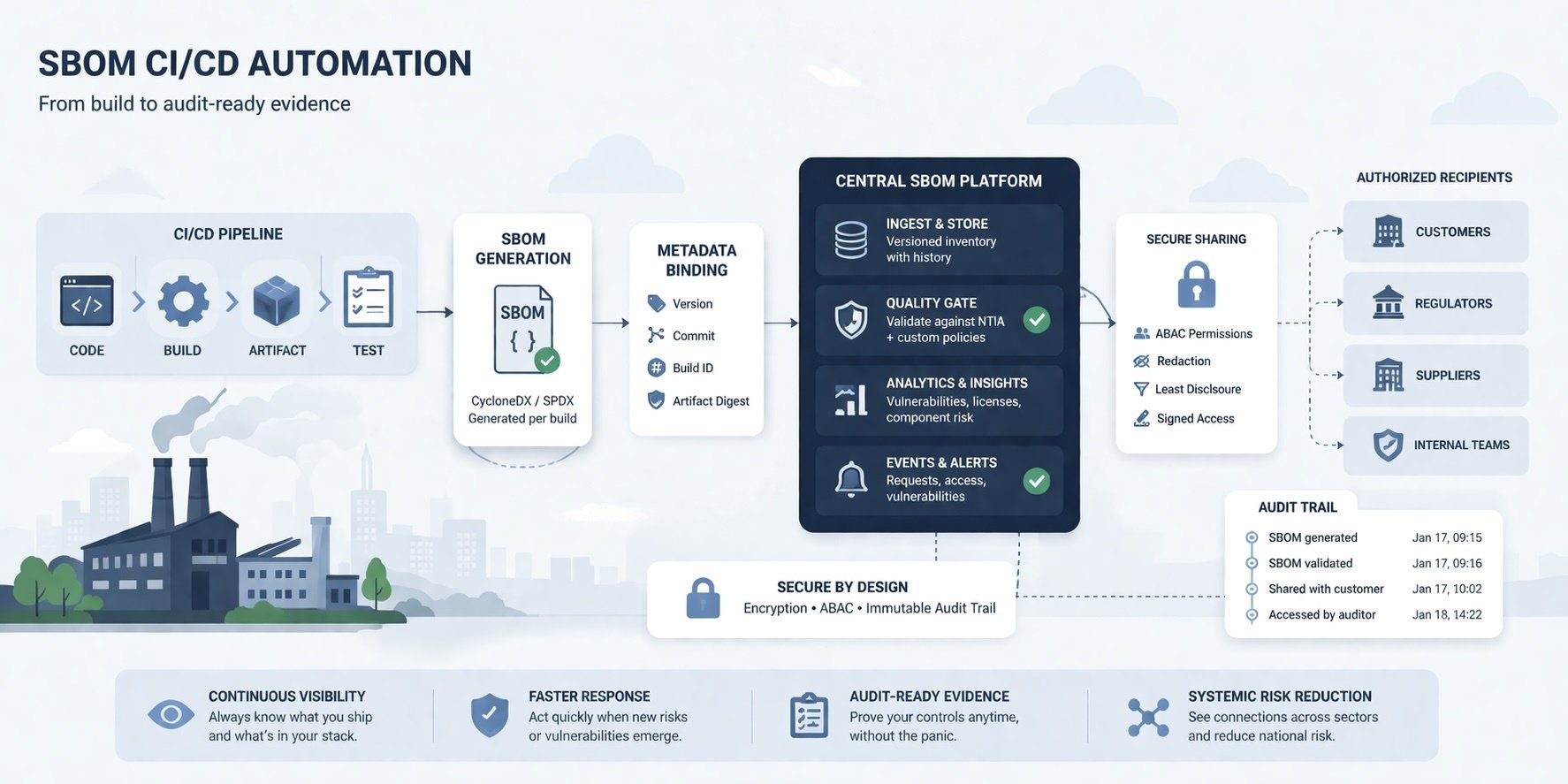
Step 0: Standardize your contract
Decide (and document):
- accepted formats (SPDX/CycloneDX)
- what “release binding” fields you require
- what’s a hard fail vs soft fail in the quality gate
(If you did the last post on acceptance criteria, this is where it becomes real.)
Step 1: Generate SBOM(s)
Generate SBOMs as close to the build as possible:
- after dependency resolution
- after container image is built (if applicable)
Step 2: Bind metadata
Attach:
- product/service name
- version tag
- commit SHA
- build ID
- artifact digest (image digest, binary hash)
Step 3: Ingest to a central system
Upload SBOM + metadata into a centralized inventory so it’s queryable, versioned, and shareable. Exodos supports automated ingestion from CI/CD pipelines into a centralized repository with version control.
Step 4: Run the quality gate
Validate automatically:
- schema validity
- required fields
- identifier quality
- completeness/scope rules
- your org’s acceptance criteria
Exodos supports automated quality validation against NTIA + custom policies (quality gates).
Step 5: Decide what happens on fail
Two sane options:
- Block release (regulated/high-risk products): hard-fail gate blocks deploy
- Ship with an exception (early maturity): ship, but automatically create a ticket + time-boxed remediation
Whatever you choose, make it consistent and auditable.
Step 6: Publish + share (controlled)
If a customer/regulator/supplier needs it:
- share via ABAC + redaction
- log access and sharing events
Exodos supports secure inter-company SBOM sharing with ABAC, redaction, and immutable audit trails.
Step 7: Monitor changes and risk
At minimum:
- diff SBOMs between releases
- alert on “new component added,” “license changed,” “SBOM missing,” and “new vuln affects our apps”
Exodos’ docs call out live updates/versioned SBOMs and notifications for key events like new vulnerabilities and SBOM request status changes.
A tiny example (GitHub Actions-style pseudocode)
# Pseudocode: generate SBOM, bind metadata, upload, gate
steps:
  - checkout
  - build
  - generate_sbom: syft packages dir:./ -o cyclonedx-json > sbom.json
  - bind_metadata:
      version: $GIT_TAG
      commit: $GITHUB_SHA
      build_id: $GITHUB_RUN_ID
      artifact_digest: $IMAGE_DIGEST
  - upload_to_inventory:
      endpoint: EXODOS_API
      file: sbom.json
      metadata: build_meta.json
  - quality_gate:
      policy: "prod-minimum"
      on_fail: "block"   # or "ticket"
(Use whatever SBOM tooling fits your stack. Тhe architecture is the point.)
The 8 failure modes that quietly break SBOM automation
- SBOM generated, but not bound to the artifact (no digest/build ID)
- SBOM stored in the repo (not inventory) → hard to query/share/audit
- Gate runs, but results aren’t stored → no proof of operation
- Pipeline generates SBOM before final dependencies are resolved
- No handling for exceptions → every fail becomes a debate
- No version history → you can’t diff, detect drift, or prove “per release” operation
- Sharing via email attachments → chain-of-custody evaporates
- No events/alerts → failures silently accumulate until audit day
Exodos’ emphasis on a centralized repository with versioning, quality gates, secure sharing controls, and immutable audit trails is basically a direct antidote to these failure modes.
A 30-day rollout plan (practical)
Week 1: Pick one product line + one pipeline. Define acceptance criteria v0.1.
Week 2: Generate SBOM per build and ingest centrally with release binding.
Week 3: Turn on quality gate (start in “warn/ticket” mode if needed).
Week 4: Enable controlled sharing + export your first audit packet sample.
Track 3 metrics:
- Coverage (% of releases with SBOMs)
- Freshness (age since last update)
- Pass rate (quality gate pass/fail + top failure reasons) These are also suggested success metrics in Exodos’ operating-model materials.